Smart Lock Installation Pitfalls: Door Fit, Batteries, and Guest Access
A smart lock only feels smart when it installs cleanly, opens reliably, and lets the right people in. Here are the door-fit, battery, and access mistakes that trip up most first-time installs — and how to avoid them.
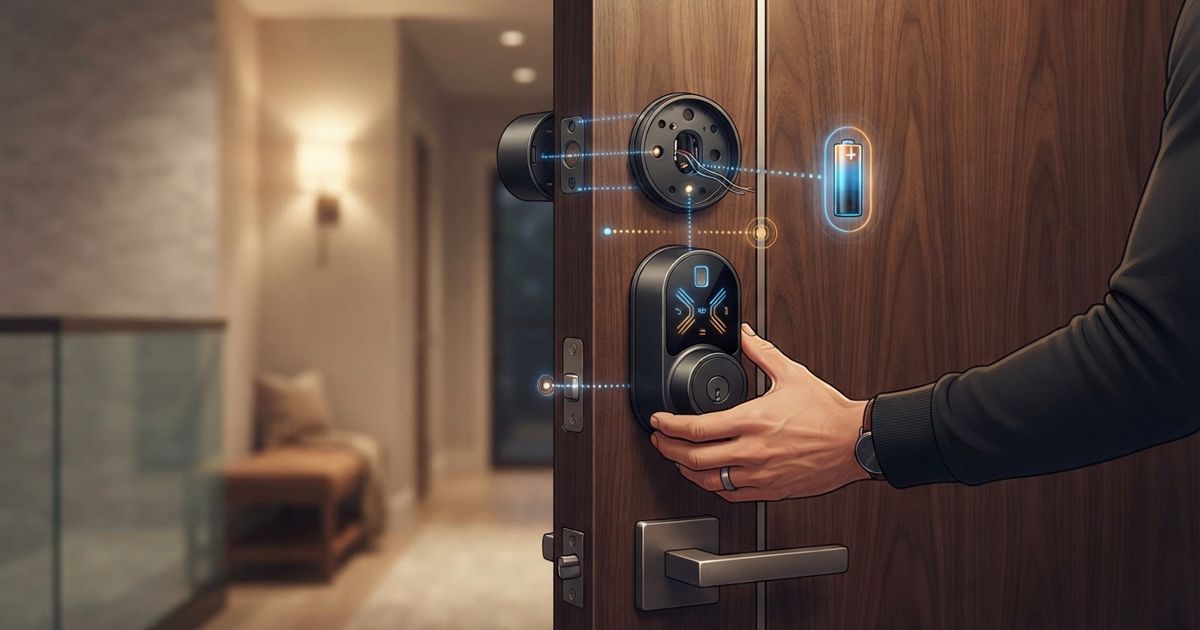
Table of contents
A smart lock is one of the most satisfying upgrades in a connected home — right up until the moment it grinds, throws a jam error, or refuses to recognize a family member at the worst possible time. Almost none of those problems are about the "smart" part. They come from the boring mechanical and setup details that get skipped in the excitement of unboxing. If you plan for door fit, batteries, and access before you pick up a screwdriver, most installs take an evening and just work.
Measure the door before you buy anything
The single biggest cause of returns is a lock that physically doesn't fit the door. Before buying, check a few dimensions on your existing deadbolt.
- Backset: the distance from the edge of the door to the center of the bolt hole. Most residential doors use one of two standard backsets, and many locks adjust between them — but confirm yours does.
- Door thickness: thin or unusually thick doors can fall outside a lock's supported range, leaving the interior assembly loose or the bolt unable to fully throw.
- Bore hole diameter: the round cutout for the lock body. Retrofit locks that reuse your existing deadbolt sidestep this, but full replacements need a matching bore.
- Edge bore: the hole through the door edge where the bolt sits.
If your door is old, painted many times over, or slightly warped, dry-fit the hardware before final tightening. A door that "closes fine" with a manual deadbolt can still bind a motorized bolt, because the motor needs the strike plate and bolt to line up almost perfectly.
Retrofit vs. full replacement
Retrofit locks keep your existing exterior hardware and deadbolt, swapping only the interior thumb-turn for a motorized unit. They install fastest, keep your existing keys, and are renter-friendly because the outside of the door is untouched. The trade-off is that you inherit any stiffness in the old mechanism — so if your deadbolt is already hard to turn by hand, fix that first.
Full replacements give you keypads, fingerprint readers, or new key systems, but they demand that door fit is spot-on. For a comparison of lock types and features, see our Best Smart Locks 2026 guide, and if you're curious where hands-free unlocking is heading, we cover UWB and Aliro locks separately.
The strike plate is where installs live or die
Once the lock is mounted, the most common recurring complaint is bolt jams. The fix is almost always the strike plate — the metal plate on the door frame the bolt slides into.
- Make sure the bolt can extend fully without scraping the plate's edges. Motorized locks read resistance as a jam and back off, leaving the door effectively unlocked.
- If the hole is too tight, file or reposition the strike slightly so the bolt drops in cleanly with the door closed.
- Weatherstripping and seasonal swelling change alignment. A lock installed in summer may bind in winter; leave a hair of clearance.
Run the calibration or "door sensor" setup step if your lock offers one. It teaches the motor how far the bolt should travel, which dramatically reduces false jam errors.
Batteries: plan for the failure, not just the runtime
Manufacturers quote battery life in months, but real numbers depend on how often the lock cycles, whether it uses Wi-Fi directly or a low-power radio, and how cold the door gets. Rather than chasing a specific figure, plan around these principles:
- Keep spare batteries nearby and learn how to swap them without tools. You will always run low at an inconvenient time.
- Watch for the low-battery warning in the app and don't ignore it. Locks slow down and skip Wi-Fi check-ins as voltage drops, which looks like a connectivity bug.
- Know your backup entry. Whether it's a physical key, a nine-volt jump terminal, or a mechanical override, confirm it works during install — not during a lockout.
- Cold matters. Exterior doors in freezing climates drain batteries faster; a lock that lasts all summer may need mid-winter swaps.
Locks that talk directly to Wi-Fi tend to be hungrier than those using a low-power mesh radio bridged to your network. If battery swaps annoy you, that radio choice matters more than the headline runtime.
Guest access is a feature, not an afterthought
The whole point of a smart lock is controlling who gets in without handing out metal keys. But guest access is where households get frustrated, usually because it wasn't set up deliberately.
- Use per-person codes or profiles instead of one shared code. Individual codes let you see who came and went, and revoke one person without resetting everyone.
- Set schedules for recurring visitors — a dog walker or cleaner who should only get in on certain days and hours.
- Create temporary codes for one-off guests and set them to expire. A code you forget to delete is a key you left under the mat forever.
- Check what happens offline. If your internet drops, can guests still enter with a keypad code, or does access depend on the cloud? Keypad codes stored on the lock keep working; app-only access may not.
A pre-install checklist
Before you commit, walk through this quick list:
| Check | Why it matters |
|---|---|
| Backset and door thickness | Prevents a lock that won't mount or bolt properly |
| Existing deadbolt turns easily by hand | A stiff bolt jams a motor |
| Strike plate aligned | The number-one cause of jam errors |
| Battery type stocked and swap known | Avoids lockouts |
| Offline backup entry tested | Safety net when Wi-Fi or power fails |
| Guest code plan | Real access control, not a shared code |
None of this is glamorous, but it's the difference between a lock you trust and one you fight. If a device keeps disconnecting or acting up after install, our smart home troubleshooting checklist walks through the usual radio and network culprits. Get the mechanical fit right first, treat batteries and guest access as part of the setup rather than settings you'll "get to later," and your smart lock becomes the quiet, dependable upgrade it's supposed to be.