Local Storage vs Cloud Storage for Smart Cameras and Doorbells
Where your camera footage lives shapes your privacy, your monthly costs, and whether you can review clips at all when the internet drops. A clear-eyed look at local storage versus the cloud for cameras and doorbells.
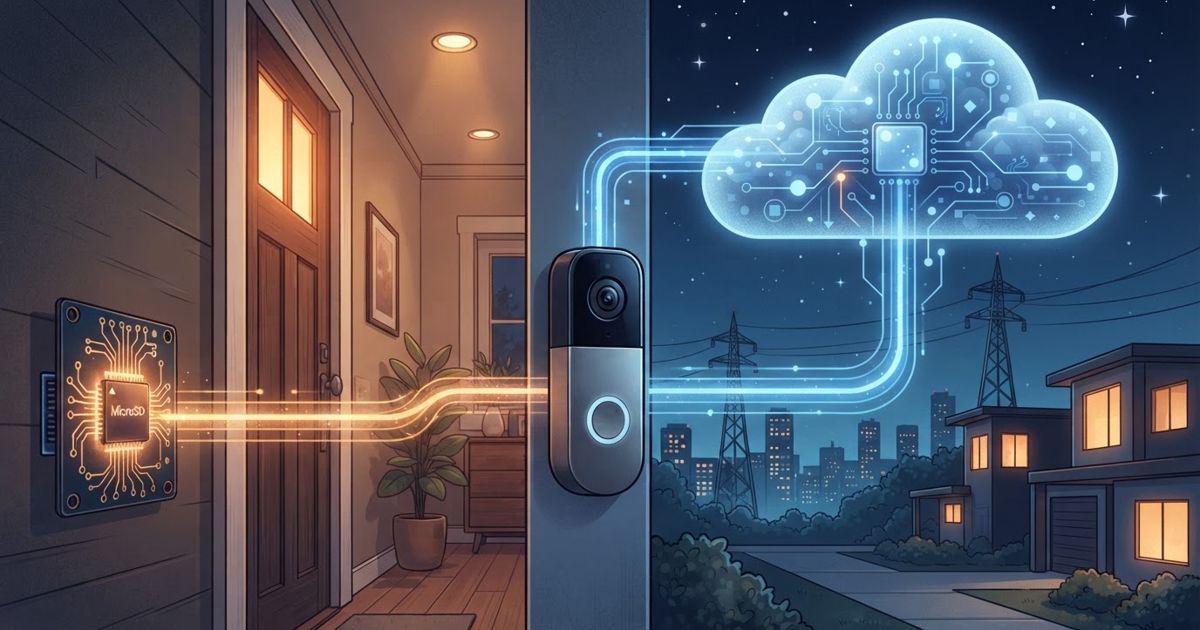
Table of contents
When you buy a smart camera or video doorbell, the sensor and the app get all the attention — but the quietly important decision is where the footage goes. Local storage keeps recordings on a card or hub in your home. Cloud storage uploads them to the manufacturer's servers, usually behind a subscription. That single choice ripples through your privacy, your ongoing costs, and whether you can even watch a clip when your internet is down. Here's how to weigh it.
The two models in plain terms
Local storage saves video to hardware you own: a memory card inside the camera, a base station with a drive, or a network video recorder. The footage physically lives in your house.
Cloud storage sends recordings over the internet to the vendor's servers, where you stream them from the app. It's almost always tied to a monthly or yearly plan, and often unlocks extra features alongside the storage itself.
Many modern systems support both, and the smartest setups frequently use a mix. But understanding each on its own makes the trade-offs obvious.
Privacy: who can reach your footage
This is where the two models differ most, and it's why storage belongs in a privacy conversation, not just a spec comparison.
- Local storage keeps footage in your control. Video doesn't leave your home unless you choose to export it, which shrinks the number of parties who could access it and removes a whole class of "someone else's server got breached" risk.
- Cloud storage places footage on a third party's infrastructure. You're trusting the vendor's security, staff access policies, and how they respond to data requests. Reputable providers encrypt footage, and some offer end-to-end encryption so even they can't view it — a feature worth seeking out if you go cloud.
Neither is automatically "safe." A local card in a camera that gets stolen loses that footage; a cloud account with a weak, reused password is exposed regardless of the vendor's defenses. The principles in our smart cameras and doorbells privacy guide — strong unique passwords, two-factor authentication, and checking encryption — apply to both models. For the wider philosophy behind keeping data in your home, see local control vs. cloud smart homes.
Cost: one-time versus forever
Cost is often the deciding factor once people do the math.
- Local storage is mostly a one-time expense. You buy a card or a hub and you're done. There may be no recurring fee to review your own footage.
- Cloud storage is a subscription. It spreads cost over time and can add up substantially across several cameras and years of ownership. Many cameras also lock key features behind that subscription — so the "free" camera can become far less useful without paying.
A crucial detail: check what the camera does without a plan. Some cameras still record locally or show a live view for free; others reduce you to live view only, with no recording at all, unless you subscribe. Knowing this before you buy prevents an unpleasant surprise. Our overview of smart home subscriptions breaks down what these plans typically include and what you lose without them.
Reliability: what happens when the internet drops
An outage exposes the practical difference between the two.
- Local storage keeps recording during an internet outage, because it doesn't need the cloud to save video. You may lose remote viewing until connectivity returns, but the footage is still being captured at home.
- Cloud storage depends on your upload connection. If your internet is down — or simply too slow to upload reliably — clips may not be saved at all. Cameras that are cloud-only can have a blind spot during exactly the moments an outage might matter.
Local storage has its own failure modes: cards wear out and can fail silently, and a thief who takes the camera or hub takes the footage with it. Cloud storage sidesteps the stolen-device problem, since the video is already off-site.
Features and convenience
Cloud services often bundle conveniences that pure local setups don't: rich smartphone notifications, person or package detection, easy sharing of clips, and access from anywhere without configuring your home network. Local setups can match much of this, but sometimes require more effort — port setup, a capable hub, or a self-hosted platform for the more technical.
Convenience of access cuts both ways. Cloud footage is available from any phone instantly; local footage may require you to be on your home network or to have set up secure remote access yourself.
A side-by-side view
| Factor | Local storage | Cloud storage |
|---|---|---|
| Ongoing cost | Usually one-time | Recurring subscription |
| Privacy exposure | Stays in your home | Held by a third party |
| Works during internet outage | Yes, keeps recording | Often no |
| Survives stolen camera | No, footage goes with it | Yes, already off-site |
| Remote access | May need setup | Built in |
| Extra features | Sometimes limited | Often bundled |
How to decide
There's no universal winner — the right choice follows your priorities:
- Privacy and cost are top concerns: lean local, and pick cameras that record to a card or hub without forcing a subscription.
- Convenience, remote access, and theft-proof footage matter most: lean cloud, and choose a provider offering encryption and, ideally, end-to-end encryption.
- You want the best of both: buy cameras that record locally and offer optional cloud backup, so everyday footage stays home while important clips are duplicated off-site.
Whatever you choose, the security basics don't change: a strong, unique password and two-factor authentication protect a cloud account, while physical placement and card reliability protect a local one. Decide where your footage should live before you buy — because on many cameras, that decision is baked into the hardware and the subscription, and it's far harder to change after the box is open.